
Leaving a review on Google + is easy if you understand how! In order to help you we have created these 6 easy to follow steps.
1. Do you have a Google Account?
- If yes, proceed to step 2.
- If no, click here and then click on the link on the top right hand corner of the page to Join Google +.
2. Go to https://plus.google.com/local. Sign into your account if necessary.
3. At the top of the page type “Just Water Heaters” and “Tucson Az” into the box and hit the SEARCH button.

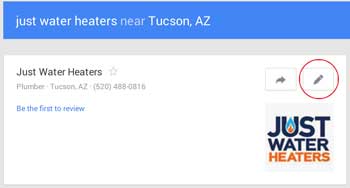 4. Click on the “Write a Review” pencil icon.
5. Rate us how many stars you would like and share a little about your experience with our company.
6. Click the publish button and you are finished!
Thank you for taking the time to leave a review! We appreciate it!